Artificial intelligence is moving beyond simply answering questions.
Modern AI systems can increasingly help users complete multi-step tasks by planning actions, interacting with websites, working with files, using tools and adapting their approach when a task requires several steps.
This is where AI agents become important.
OpenAI’s ChatGPT agent is designed to help users complete complex online tasks by combining reasoning with the ability to interact with websites and use supported tools. OpenAI describes agent mode as a way for ChatGPT to perform actions on a user’s behalf while keeping the user in control.
For example, instead of asking ChatGPT only to explain how to research a topic, an agent-style workflow can potentially help gather information, navigate websites, work with files and produce a final result.
This guide explains what ChatGPT Agents are, how agent mode works, what it can be used for, important safety considerations, limitations and how this technology may affect the future of AI-powered productivity.
Table of Contents
ToggleWhat Are ChatGPT Agents?
ChatGPT Agents are AI systems designed to perform multi-step tasks rather than simply generate a text response.
A traditional chatbot may answer:
“Here are five websites where you can research laptops.”
An agent can go further by potentially:
- Searching websites
- Comparing information
- Working with files
- Navigating web pages
- Performing multiple steps
- Producing a final report
The important difference is action.
A conversational AI primarily provides information.
An AI agent can combine information gathering, reasoning and actions to accomplish a larger objective.
What Is ChatGPT Agent Mode?
ChatGPT agent mode is an experience designed to allow ChatGPT to perform tasks on a user’s behalf.
OpenAI says the agent can navigate websites, use a visual browser, work with files and connect to supported data sources while completing tasks.
The user remains in control of important actions, and ChatGPT can ask for confirmation when necessary.
This makes agent mode different from a normal ChatGPT conversation.
ChatGPT Agent vs Normal ChatGPT
| Feature | Normal ChatGPT | ChatGPT Agent |
|---|---|---|
| Answers questions | Yes | Yes |
| Multi-step tasks | Limited | Stronger |
| Web navigation | Search-based | Can interact with websites |
| Tool usage | Depends on feature | Designed for multi-step tool use |
| File handling | Yes | Yes |
| Planning | Yes | More action-oriented |
| User confirmation | As needed | Important for sensitive actions |
| Best for | Questions & creation | Complex tasks |
The distinction is not absolute because ChatGPT has many tools outside agent mode. The key difference is that agent mode is specifically designed around completing tasks that involve multiple actions.
How Do ChatGPT Agents Work?
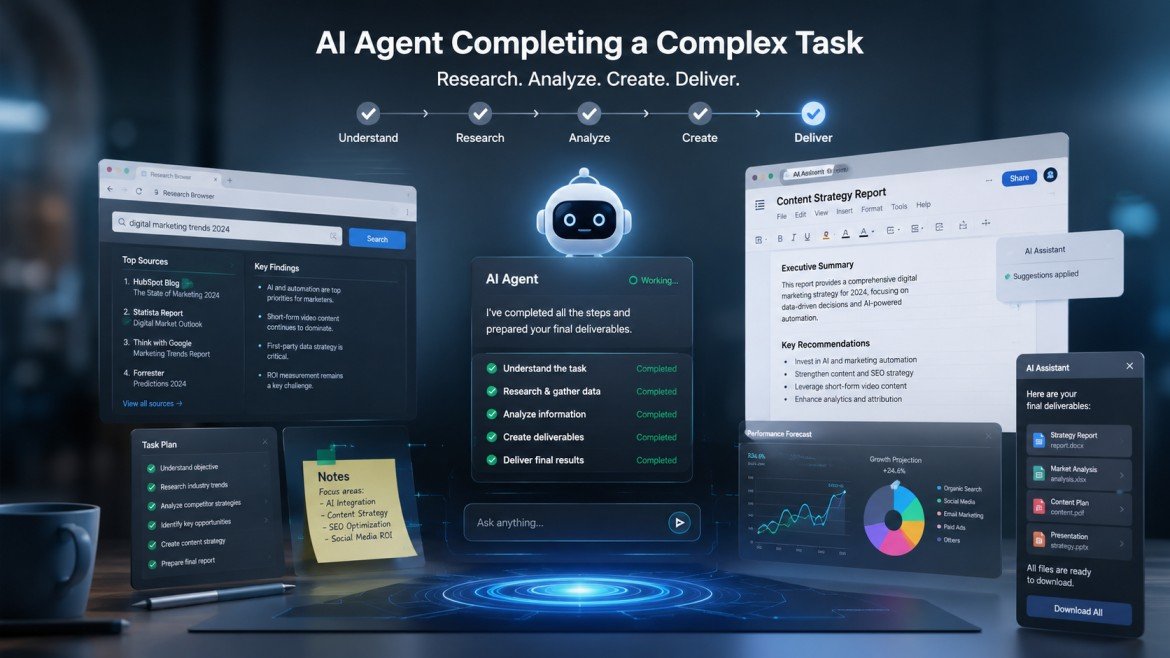
An agent-style workflow generally involves several stages.
1. Understand the Goal
The user gives ChatGPT a task.
For example:
“Research five project-management tools and prepare a comparison.”
The agent needs to understand the desired outcome rather than only a single question.
2. Plan the Task
The system can break the objective into smaller steps.
For example:
- Find relevant tools.
- Collect important information.
- Compare features.
- Organize the findings.
- Prepare a final report.
3. Use Available Tools
Depending on the current environment and permissions, the agent can use supported tools to work toward the objective.
OpenAI describes agent mode as combining capabilities such as web interaction, a virtual browser, code execution and other tools.
4. Interact With Websites
One of the important differences between agent-style AI and traditional chat is website interaction.
Instead of simply giving you a URL, an agent may be able to navigate a website and perform supported actions.
5. Ask for Confirmation When Needed
Sensitive actions may require user involvement.
This is important because an AI system should not independently make high-impact decisions simply because a user gave it a broad instruction.
6. Produce the Result
After completing the available steps, the agent can provide the requested output.
What Can ChatGPT Agents Do?
Agent capabilities can change as OpenAI updates the product, but current agent workflows are designed around complex tasks involving research, navigation, files and tools.
Examples include:
- Researching information
- Comparing products or services
- Working with spreadsheets
- Analyzing documents
- Navigating websites
- Organizing information
- Preparing reports
- Performing multi-step research
- Automating certain workflows
The exact capabilities available depend on the current ChatGPT environment, account and enabled tools.
ChatGPT Agents for Research
Research is one of the most natural applications of agent-style AI.
Suppose you need to research a topic involving several websites.
Instead of manually:
- Searching Google
- Opening websites
- Copying information
- Comparing data
- Creating notes
an agent may be able to perform several of these steps as part of one workflow.
However, users should still verify important information against original sources.
ChatGPT Agents for Businesses
Businesses can potentially use agents for repetitive knowledge-work tasks.
Examples include:
Market Research
An agent can help gather information about competitors, products or market trends.
Report Preparation
It can organize information into a structured report.
Data Analysis
Supported files and data can be analyzed as part of a larger workflow.
Administrative Work
Some repetitive information-processing activities can potentially be assisted through agent workflows.
Businesses should establish appropriate permissions and review processes before allowing AI systems to perform actions involving sensitive data.
ChatGPT Agents for SEO
Agentic AI can also affect SEO workflows.
An SEO professional could potentially use an agent to assist with:
- Competitor research
- Content research
- SERP analysis
- Topic discovery
- Content auditing
- Spreadsheet analysis
- Website research
For example:
“Analyze the top results for this topic and create a content-gap report.”
An agent can potentially perform multiple research steps instead of only explaining how to do them.
The output should still be reviewed by an SEO professional.
ChatGPT Agents for Content Creators
Content creators can use agent-style workflows for:
- Topic research
- Competitor analysis
- Content planning
- Research summaries
- Data collection
- Content briefs
- Spreadsheet analysis
A blogger could ask for a research workflow that gathers information from several sources and produces a structured content brief.
This can reduce repetitive research work.
ChatGPT Agents for Students
Students may use agent-style AI for:
- Research planning
- Source discovery
- Data organization
- Document analysis
- Study planning
However, students should follow their institution’s AI-use policies.
AI-generated research should also be checked against original academic sources.
ChatGPT Agents and Computer Use
A major concept behind agentic AI is the ability to interact with computers rather than only generate text.
OpenAI describes agent mode as having access to a virtual browser and tools that allow it to interact with websites and perform tasks.
This represents a shift from:
AI that tells you what to do
to:
AI that can help perform the steps.
That distinction is one of the most important developments in modern AI assistants.
ChatGPT Agents and Files
Agent workflows can also involve files.
Depending on the available capabilities, users may be able to work with:
- Documents
- Spreadsheets
- PDFs
- Data files
- Research materials
For example, an agent could help analyze a spreadsheet and produce a summary.
Sensitive files should be handled carefully, especially in business environments.
ChatGPT Agents and Automation
Automation is one of the biggest reasons people are interested in AI agents.
Traditional automation generally follows predefined rules:
If X happens → do Y.
Agentic systems can be more flexible because they can reason about a goal and determine intermediate steps.
For example:
Traditional automation:
New email → send predefined response.
Agent-style workflow:
Review the request → understand the problem → research relevant information → prepare a response → ask for approval if necessary.
The second workflow requires more interpretation and decision-making.
Are ChatGPT Agents Fully Autonomous?
No AI agent should be treated as completely autonomous for every type of task.
OpenAI emphasizes user control and safety measures for agent mode, including confirmation requirements for certain actions.
Users should understand what an agent is being asked to do and avoid giving unnecessary permissions.
For high-impact actions, human review remains important.
Safety and Privacy Considerations
Agentic AI introduces additional risks because the system can potentially interact with websites, files and external services.
Protect Sensitive Information
Avoid providing unnecessary:
- Passwords
- Financial information
- Confidential business documents
- Private credentials
Review Actions
Before allowing an agent to perform an important action, understand what it is doing.
Check Websites
Agents can encounter misleading pages or instructions.
Users should be cautious when an external website asks for sensitive information.
Use Minimum Necessary Access
Only provide the permissions required to complete the task.
What Is Prompt Injection?
Prompt injection is an important security concept for AI agents.
A webpage, document or other piece of content may contain instructions designed to influence an AI system.
For example, a malicious webpage could contain hidden or visible instructions telling an AI agent to ignore the user’s original goal.
This is particularly important for agents because they can interact with external content.
Users and developers should therefore treat external instructions as potentially untrusted.
Why Agent Safety Matters More Than Normal Chat
A traditional chatbot response can be wrong.
An agent can potentially take an action based on a wrong interpretation.
That makes the consequences different.
For example:
Wrong chatbot answer:
“Here is an incorrect explanation.”
Wrong agent action:
“An incorrect action was performed on a website.”
This is why permissions, confirmations and human oversight are important.
ChatGPT Agents vs AI Chatbots
| Capability | AI Chatbot | AI Agent |
| Conversation | Yes | Yes |
| Text generation | Yes | Yes |
| Planning | Basic to advanced | Core capability |
| Multi-step execution | Limited | Core capability |
| Tool use | Sometimes | Important component |
| Website interaction | Usually limited | Can be supported |
| Autonomous workflow | Limited | More capable |
| Human oversight | Recommended | Critical |
Not every AI product uses the word “agent” in exactly the same way, so users should examine the actual capabilities rather than relying on the label.
ChatGPT Agents vs ChatGPT Tasks
These features solve different problems.
ChatGPT Tasks are focused on scheduled instructions and recurring activities.
ChatGPT Agents are focused on completing more complex, multi-step tasks using available tools.
For example:
Task:
“Every Monday, remind me to review my SEO report.”
Agent:
“Research my competitors, compare their recent content and prepare an SEO opportunity report.”
The two concepts can complement each other.
ChatGPT Agents vs ChatGPT Projects
Projects organize ongoing work.
Agents focus on performing complex tasks.
A useful workflow could involve:
Project → Store context and files
Agent → Perform a research or execution task
This can be particularly useful for businesses and content teams.
Benefits of ChatGPT Agents
Saves Time
Agents can help automate repetitive multi-step workflows.
Reduces Manual Research
Information gathering can potentially be performed more efficiently.
Handles Complex Tasks
Agent-style systems can work through multiple steps rather than stopping after a single answer.
Improves Productivity
Professionals can spend more time reviewing results and making decisions.
Connects AI With Actions
Agents move AI beyond text generation toward practical task completion.
Limitations of ChatGPT Agents
AI Can Make Mistakes
An agent may misunderstand a goal or make an incorrect decision.
Availability Can Change
Agent capabilities, limits and supported tools can change as OpenAI updates the product.
Not Every Website Works Perfectly
Websites can have authentication requirements, technical restrictions or interfaces that are difficult for automated interaction.
Human Oversight Is Still Required
Important actions should not be blindly delegated to AI.
Best Prompts for ChatGPT Agents
Good agent instructions should clearly define the objective.
Research Prompt
“Research five leading AI SEO tools, compare their main features, pricing information and target users, and present the findings in a table. Cite the original sources.”
Content Research Prompt
“Research this topic using reliable sources, identify the main questions users have, and create a detailed content brief.”
Competitor Research Prompt
“Analyze these competitor websites and identify their main content categories, common topics and potential content gaps. Separate observed information from your recommendations.”
Data Analysis Prompt
“Analyze this spreadsheet, identify the most important trends, explain the findings and create a concise summary.”
The more clearly the goal and expected output are defined, the easier it is to review the result.
How to Get Better Results From AI Agents
Define the Goal
Tell the agent exactly what successful completion looks like.
Set Boundaries
Specify what it should not do.
Identify Sources
For research tasks, tell it to prioritize official or primary sources.
Require Verification
Ask the agent to identify important claims that require manual verification.
Request a Final Summary
Ask for a clear explanation of what it did and what remains incomplete.
Frequently Asked Questions
What are ChatGPT Agents?
ChatGPT Agents are designed to help users complete multi-step tasks by combining reasoning with tools and supported computer or web interactions.
What is ChatGPT Agent Mode?
Agent Mode is the ChatGPT experience designed for performing complex tasks on a user’s behalf using available tools and capabilities.
Can ChatGPT Agents browse websites?
Agent mode can interact with websites using a virtual browser and supported capabilities, according to OpenAI’s documentation.
Can ChatGPT Agents analyze files?
Agent workflows can work with supported files and data as part of broader tasks, depending on the available tools and environment.
Are ChatGPT Agents fully autonomous?
No. Users should maintain oversight, particularly for sensitive or consequential actions.
Can ChatGPT Agents automate business tasks?
They can assist with suitable multi-step workflows, but businesses should establish appropriate permissions, security controls and human review.
Are ChatGPT Agents safe?
OpenAI has implemented safeguards and user-control mechanisms, but no complex AI system should be considered risk-free. Users should review actions and avoid unnecessary access to sensitive information.
What is the difference between ChatGPT Tasks and Agents?
Tasks focus on scheduled or recurring instructions, while Agents are designed for more complex multi-step task execution.
Final Thoughts
ChatGPT Agents represent an important evolution in AI assistants.
Traditional chatbots primarily help users generate and understand information. Agentic systems aim to go further by helping users complete tasks using planning, tools and interactions with digital environments.
This could have a major impact on productivity, research, SEO, content creation, software development and business operations.
But greater capability also means greater responsibility.
Users should carefully review agent actions, protect sensitive information, use appropriate permissions and verify important results.
The most useful way to think about ChatGPT Agents is not as a replacement for human decision-making, but as a powerful assistant that can potentially handle repetitive and multi-step work while humans remain responsible for important decisions.