The landscape of mobile video editing is expanding rapidly. With the rise of platforms like TikTok, Instagram Reels, and YouTube Shorts, everyone—from casual users sharing life moments to professional content creators—is looking for powerful, intuitive tools to craft high-quality video content on the go.
One name that frequently surfaces in searches and discussions is XVideoStudio Video Editor. Its reputation for robust features, creative filters, and user-friendly interface has made it a highly sought-after application.
However, a significant point of confusion exists for a large portion of smartphone users: How can I download the XVideoStudio Video Editor APK for iOS?
This comprehensive guide is designed to answer that question decisively. We will explore the technical realities of iOS versus Android, dive deep into the genuine features of XVideoStudio, provide safe and legitimate alternatives for iPhone and iPad users, and discuss essential security practices for mobile editing.
Part 1: Addressing the APK on iOS Conflict
Before we can discuss downloading XVideoStudio, we must address the fundamental technical misunderstanding central to the search query.
The Problem: APK vs. IPA
The core issue lies in the file format. The user is searching for an APK file for iOS. This is technically impossible.
-
APK (Android Package Kit): This is the executable file format used exclusively by the Android operating system (developed by Google) to distribute and install applications. APK files rely on the Android runtime environment and specific system architecture.
-
IPA (iOS App Store Package): This is the executable file format used exclusively by iOS and iPadOS (developed by Apple). IPA files are highly encrypted and designed to run within Apple’s closed “sandbox” environment.
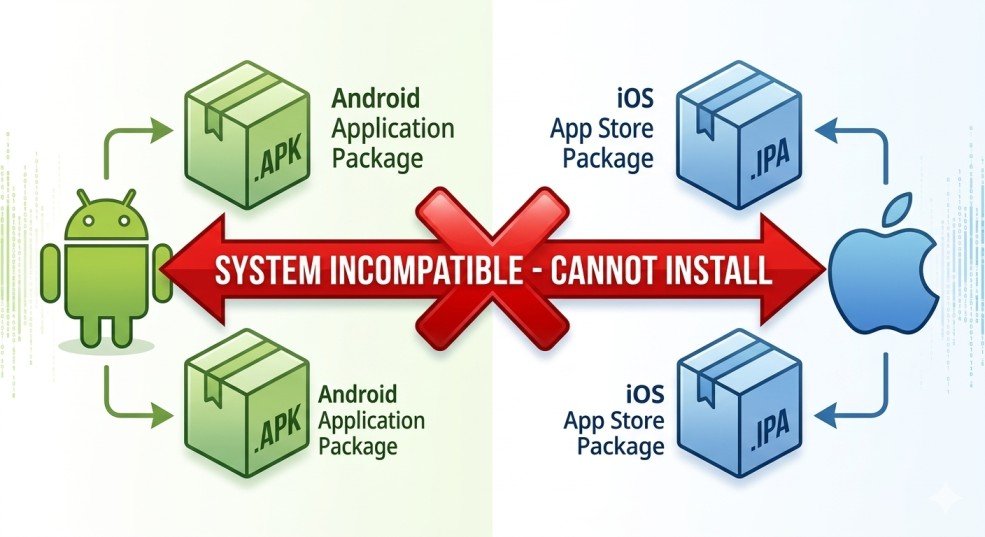
An iPhone cannot recognize or execute an APK file, just as an Android phone cannot run an IPA file. Searching for an “XVideoStudio.video editor apk download for ios” is seeking a file that cannot exist in a functional form.
Why You See Search Results for “XVideoStudio APK for iOS”
If it’s technically impossible, why do so many websites claim to offer exactly that? There are three main reasons:
-
Clickbait and Misinformation: Many websites generate content based purely on high-volume search terms. They know users are searching for this combination, so they create pages with these keywords to attract traffic, even if the underlying download links are broken, fake, or point to different, unrelated software.
-
Scams and Malware: Malicious actors exploit user confusion. These sites may offer a file disguised as the “XVideoStudio iOS APK.” Downloading and attempting to interact with such files (often requiring jailbreaking or installing unauthorized profiles) can compromise your iOS device’s security, leading to data theft or malware infection.
-
Confusion with Other Tools: Sometimes, users mistake general video downloaders (tools that save videos from studios) with actual video editing suites.
Part 2: What is the Genuine XVideoStudio Video Editor?
Assuming the interest stems from the reputation of the actual XVideoStudio editor available on legitimate platforms, let’s explore what makes this software desirable. It is important to note that the availability and exact feature set of “XVideoStudio” can vary greatly, as many apps use similar naming conventions. We are focusing on the features typically associated with highly-rated mobile video editors in this category.
Core Editing Capabilities
A professional-grade mobile editor must handle the basics flawlessly. The features users seek in XVideoStudio generally include:
-
Precise Trimming and Cutting: The ability to accurately frame-by-frame edit clips, removing unwanted sections with ease.
-
Splitting and Merging: Combining multiple video files, photos, and audio tracks into a seamless timeline.
-
Speed Control: Creating dynamic content with slow-motion (slomo) highlights or high-speed time-lapses.
-
Reverse Playback: A popular creative effect for social media clips.
Advanced Creative Tools
Beyond the basics, XVideoStudio is often recognized for tools that elevate content quality:
-
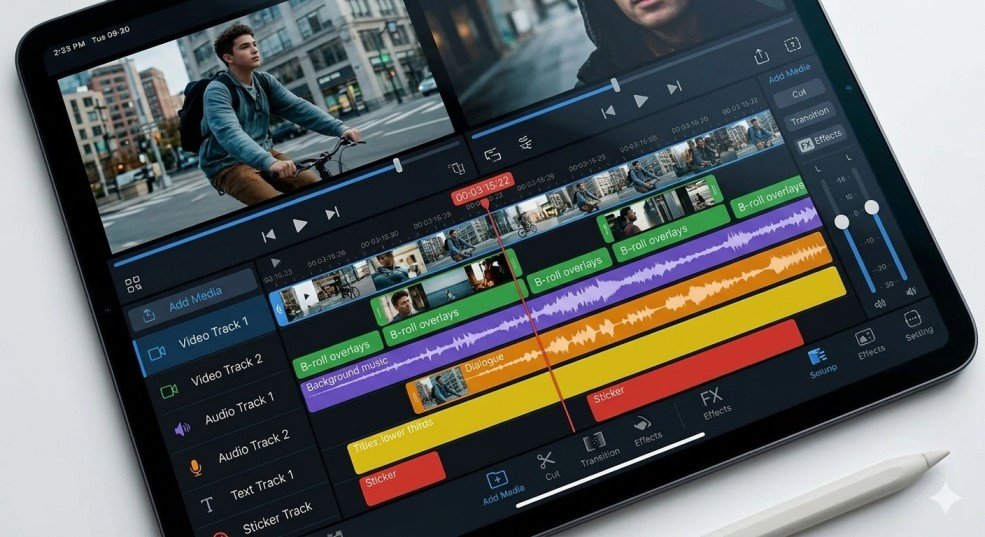
Multi-Layer Timeline: The critical ability to overlay videos (PIP – Picture in Picture), place text, add stickers, and manage audio tracks independently.
-
Chroma Key (Green Screen): A powerful feature for changing backgrounds and creating complex visual effects, previously reserved for desktop software.
-
Keyframe Animation: Allowing editors to animate elements (like text or logos) smoothly across the screen by defining start and end points.
Audio and Music Integration
Video is only half the story. The ideal XVideoStudio experience includes robust audio options:
-
Built-in Music Library: Access to royalty-free tracks suitable for background music.
-
Voiceover Recording: The ability to record and sync narration directly within the editing timeline.
-
Sound Effects (SFX): A library of sounds (pops, whooshes, transitions) to enhance engagement.
-
Audio Editing: Adjusting volume levels, fading audio in/out, and applying basic voice filters.
Visual Effects, Filters, and Transitions
To make videos stand out, creators rely on the application’s aesthetic library:
-
Cinematic Filters: Pre-set color grading options (LUTs) that instantly change the mood of the footage (e.g., vintage, movie-style, vibrant).
-
Seamless Transitions: High-quality effects to glide between clips (dissolves, slides, zooms, glitches) rather than jarring cuts.
-
Glitch and AI Effects: Popular modern effects that distort or intelligently modify the video.

Part 3: The Danger of Searching for “iOS APKs”
As established, an “iOS APK” is a red flag. If you encounter a site promising this, you are facing significant security risks.
The Security Model of iOS
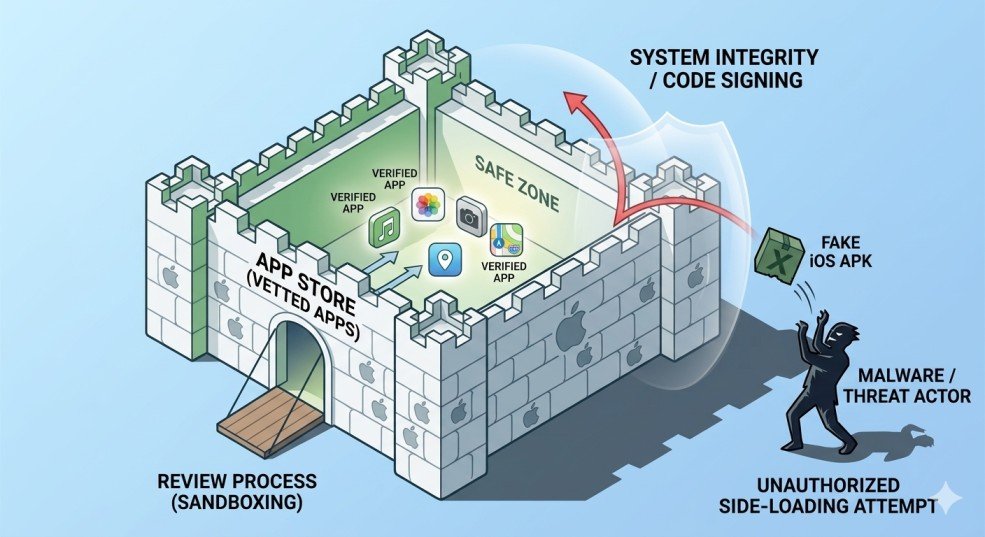
iOS is a “closed garden.” Apple controls the hardware, the operating system, and the primary app distribution channel (the App Store). This architecture is designed for security:
-
App Sandboxing: Each app runs in its own isolated environment (sandbox). It cannot access data from other apps or core system files without explicit permission.
-
Code Signing: Every app on the App Store must be digitally signed by Apple, verifying its source and integrity.
-
App Review: Apple reviews every app submission to ensure it adheres to safety, privacy, and performance standards.
Risks of “Sideloading” Unverified Files
“Sideloading” is the practice of installing apps from sources other than the official App Store. While possible on iOS through complex methods (enterprise certificates, AltStore, or jailbreaking), it bypasses Apple’s security model and introduces severe dangers:
-
Malware and Spyware: Unverified applications can contain malicious code designed to steal sensitive data (passwords, contacts, photos, financial information), log keystrokes, or track your location.
-
Phishing Attacks: The “installation guide” for these fake APKs often involves visiting deceptive websites that attempt to steal your Apple ID credentials.
-
Device Instability: Unauthorized software can corrupt system files, leading to frequent crashes, boot loops (where the phone won’t turn on past the Apple logo), and battery drain.
-
Voiding Warranty: Jailbreaking or installing unauthorized profiles can void your device’s warranty.
Part 4: Safe, Powerful Video Editors for iOS
If your goal is professional-grade video editing on your iPhone or iPad, you do not need to risk your security. The iOS App Store hosts some of the best mobile video editing software in existence.
Here are the legitimate, powerful alternatives that provide the features users seek in “XVideoStudio.”
1. DaVinci Resolve for iPad (Professional/Free)
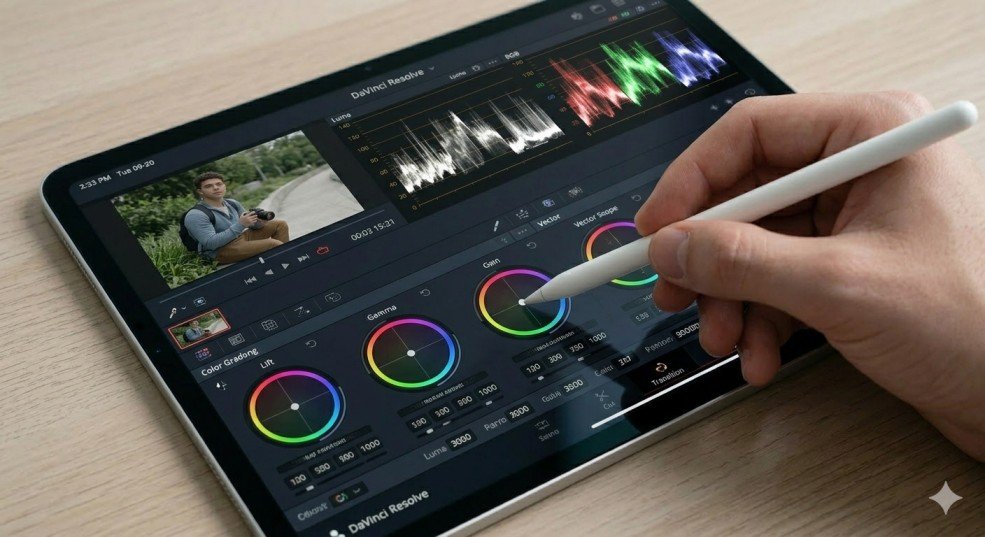
The biggest story in mobile editing recently is Blackmagic Design bringing DaVinci Resolve to the iPad. This isn’t a “mobile version”—it’s the actual desktop code optimized for touch and the M1/M2 chips.
-
Why it’s a Legitimate Alternative: It offers industry-standard, Hollywood-grade color correction, the Cut Page for fast editing, and professional audio tools.
-
Key Features: Multi-track editing, incredibly advanced color grading (HDR support), AI-powered magic mask, compatibility with desktop project files.
-
Cost: Free (with a one-time in-app purchase for Resolve Studio features).
2. LumaFusion (Professional/Paid)
For years, LumaFusion has been the undisputed king of professional iOS video editing. It is a full non-linear editor (NLE) designed from the ground up for touch interaction.
-
Why it’s a Legitimate Alternative: If you want desktop-class power with an intuitive iOS interface, LumaFusion is the answer. It handles complex projects smoothly.
-
Key Features: Up to 6 video/audio tracks for photos, videos, titles, and graphics; magnetic timeline; powerful color correction; keyframe animation; green screen; support for external drives.
-
Cost: One-time purchase.
3. CapCut (Creative/Social Media/Free)
Developed by ByteDance (the creators of TikTok), CapCut is the go-to editor for viral content creators. It balances ease of use with surprisingly advanced features.
-
Why it’s a Legitimate Alternative: It excels at the social media workflow, offering the best built-in trends, transitions, and AI-driven effects.
-
Key Features: Intuitive timeline, massive library of music and sound effects, advanced body effects, auto-captions, 3D zoom, background removal.
-
Cost: Free (with optional CapCut Pro subscription for advanced assets).
4. VN Video Editor (Intuitive/Free)
VN (Vlog Now) is a fantastic, slightly simpler alternative to CapCut, loved for its clean interface and lack of watermarks on the free version.
-
Why it’s a Legitimate Alternative: It provides essential multi-layer editing features in an approachable package, perfect for YouTube vlogs and social media.
-
Key Features: Multi-track timeline, curve speed adjustment, keyframe animation, diverse filters, screen recording import.
-
Cost: Free (with optional subscription).
5. KineMaster (Versatile/Subscription)
KineMaster is a long-standing powerhouse in mobile editing, available on both iOS and Android. It offers a landscape interface reminiscent of traditional desktop editors.
-
Why it’s a Legitimate Alternative: It provides a very deep feature set, including many advanced tools comparable to XVideoStudio’s reputation.
-
Key Features: Multiple video layers, chroma key (green screen), blending modes, speed control, keyframe animation, Asset Store for effects and music.
-
Cost: Subscription-based (free version includes a watermark).
6. iMovie (Basic/Free/Apple Original)
We cannot discuss iOS editors without mentioning Apple’s own iMovie. While not as advanced as the others listed, it is excellent for beginner projects.
-
Why it’s a Legitimate Alternative: If you are new to editing, iMovie is the safest, easiest, and completely free place to start. It is pre-installed on most devices.
-
Key Features: Simple trailer templates, basic timeline editing, themes, transitions, green screen support (basic), simple titles.
-
Cost: Free (exclusive to Apple devices).
Part 5: Safe Downloading Practices for iOS Video Editors
To protect yourself and your device, you must adopt safe habits when downloading any software, especially highly sought-after creative tools.
The Golden Rule: Use the Official App Store
There is only one safe method to download apps on iOS: The Apple App Store.
-
Open the App Store icon on your iPhone or iPad.
-
Tap the Search tab.
-
Type the name of the legitimate editor you wish to install (e.g., “CapCut,” “LumaFusion,” “DaVinci Resolve”).
-
Verify the Developer: Before tapping ‘Get’ or the price, look at the developer name listed directly below the app title. Ensure it is the correct company (e.g., “ByteDance Ltd.” for CapCut, “Blackmagic Design Inc” for DaVinci Resolve).
-
Read Reviews: Scan recent reviews to ensure the app is performing well and isn’t receiving complaints about scams or excessive ads.

Signs of a Malicious Download Site
If you must search online for information about an app, be vigilant. Avoid sites that:
-
Promote “iOS APKs”: This is the single biggest indicator of a scam or malicious content.
-
Require Profile Installation: Do not install configuration profiles (Settings > General > VPN & Device Management) from unverified websites. These profiles can grant deep system access to attackers.
-
Request Jailbreaking: Any site that states you must “jailbreak” your device to use the app is asking you to destroy your device’s primary security defense.
-
Are Filled with Aggressive, Deceptive Ads: Sites that cover the content with pop-ups, fake “Download Now” buttons, and system warnings are usually malicious.
Conclusion: Priority on Power and Security
The demand for high-quality mobile video editing tools is only going to increase. In this creative rush, it is easy to get confused by complex technical terms and aggressive marketing.
However, the reality remains clear: You cannot, and should not, attempt to download an XVideoStudio Video Editor APK for iOS.
Seeking this non-existent file format only leads to websites designed to compromise your device’s security, steal your data, and potentially brick your iPhone or iPad.
iOS users are not disadvantaged; they have access to an incredible ecosystem of legitimate, powerful, and secure editing applications available directly through the App Store. Whether you choose the viral creative power of CapCut, the professional authority of LumaFusion, or the desktop-grade sophistication of DaVinci Resolve, you can achieve professional results without risking your digital safety.
Prioritize your security. Use the App Store. Master the incredible tools that are genuinely available to you, and let your creativity thrive safely.